
If we have asked you to provide us with access to your Paypal account this article will help you add mi-fi as a user with the correct permissions.
It is important to note that we do not want access to make transactions on your account. We only require access to obtain transactional information to help us with the reconciliation of your accounts. We will never ask for access that allows us to make payments on your account.
1. Log in to Paypal
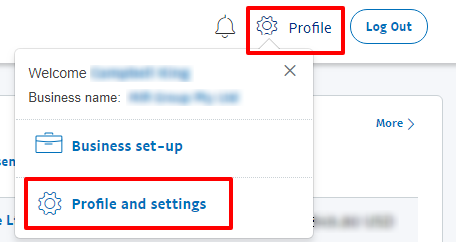
2. Go to Profile > Profile and settings
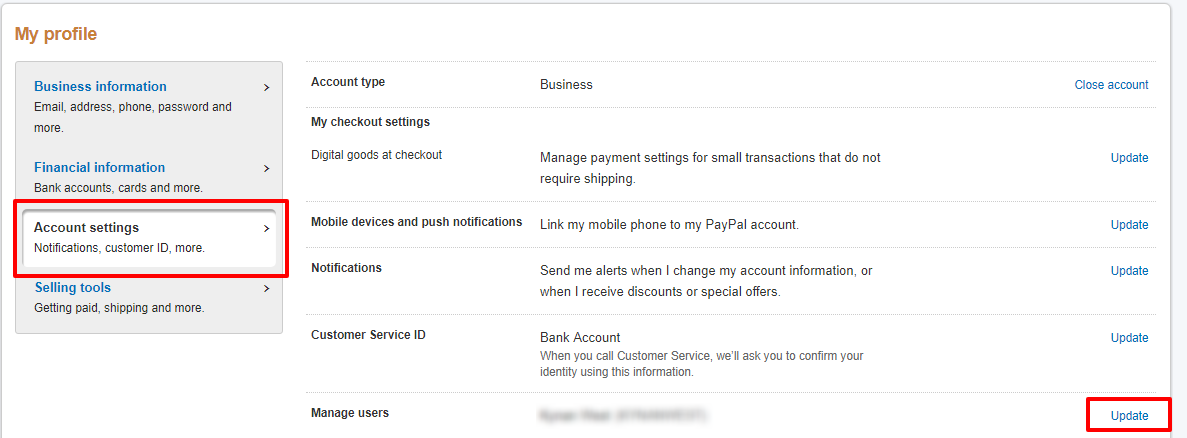
2. Go to Account Settings > Manage Users > Update
3. Add User
Account Credentials
User ID: mifi-[Business Name] where [Business Name] should be replaced with a reference to your business i.e. if your business was ACME Pty Ltd the User ID would be mifi-ACME.
Password: Please use a random selection of upper and lower case letters plus numbers and punctuation.
Please send the User ID and Password to applogin@mifi.com.au
Personal Information
First Name: mifi
Last Name: mifi
Date of Birth: 01/01/2000
Residential Address
Level 3/520 Bourke Street, Melbourne VIC 3000
The Personal Details and Residential address are not strictly important and anything should do.
4. Permissions
Please provide the permissions as per the image below.
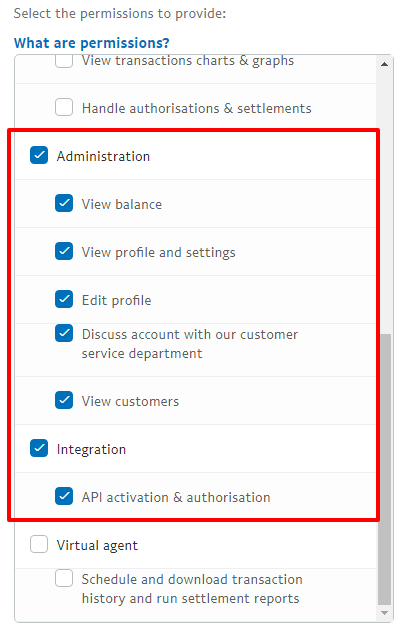
mi-fi will never ask for any permissions that allow us to transact on your account.
Remember to send the User ID and Password to applogin@mifi.com.au
Comments
0 comments
Please sign in to leave a comment.